The easy way to pull file information needed to create Intune Endpoint Privilege Management (EPM) app elevation rules policies.
Why This Script Exists
When creating EPM app elevation rules policies, there’s always one main challenge: identifying the correct app attributes needed to create a reliable elevation rule. Whether you are building a publisher rule, certificate rule, or file hash rule, collecting the necessary application identity information can become tedious and error prone.
Enter Get-EPMInfo.ps1.
What the Script Does
At its core, Get-EPMInfo.ps1 acts as an application identity collector for Endpoint Privilege Management. The script analyzes an executable, installer, or script and generates a report containing the information commonly required for EPM rule creation. Just run it against a supported file (executables, Windows Installer packages, PowerShell scripts, etc.) and the script quicky generates documentation-ready output along with the file’s publisher cert (if signed).
- SHA256 Hash Collection. The script automatically calculates a SHA256 hash using Get-FileHash with the SHA256 algorithm. The hash is included in both the console summary and the final report.
- Digital Signature Analysis. The script performs a full Authenticode inspection using Get-AuthenticodeSignature to determine whether the file is signed, the signature status, whether the file is identified as an operating system binary, and which certificate was used for signing.
- Publisher Certificate Collection. For signed applications, Get-EPMInfo.ps1 extracts detailed certificate information including subject name, issuer name, thumbprint, serial number, certificate validity dates, signature algorithm, and public key algorithm.
- App Metadata Collection. Standard file version information is collected directly from the target file, including product name, internal name, company name, file description, original filename, and file version.
- Automatic Certificate Export. One of the script’s most useful features is its ability to export the application’s signing certificate. When a valid signer certificate is found, the script automatically creates an ApplicationName.cer file. The exported certificate can be used when creating an EPM policy, for offline inspection, security validation, certificate chain analysis, documentation packages, or EPM troubleshooting.
Having all this information comes in handy when deciding what type of rule to create. Stable vendor signatures may favor publisher rules, frequently changing certificates may favor hash rules, and internal business applications may require metadata validation before policy creation.
How to Get the Script
As usual, the script is available in my GitHub repo and you can also grab it from the PowerShell Gallery.
- GitHub Repo (https://github.com/jeffgilb/Get-EPMInfo/blob/main/Get-EPMInfo.ps1)
- PowerShell Gallery (https://www.powershellgallery.com/packages/Get-EPMInfo/)
- Save-Script -Name Get-EPMInfo -Path C:\Temp\
How to Run the Script
You can provide a file path as a parameter on the command line (with or without quotes for all you “Copy as path” fans) or launch the script interactively and respond to a prompt:
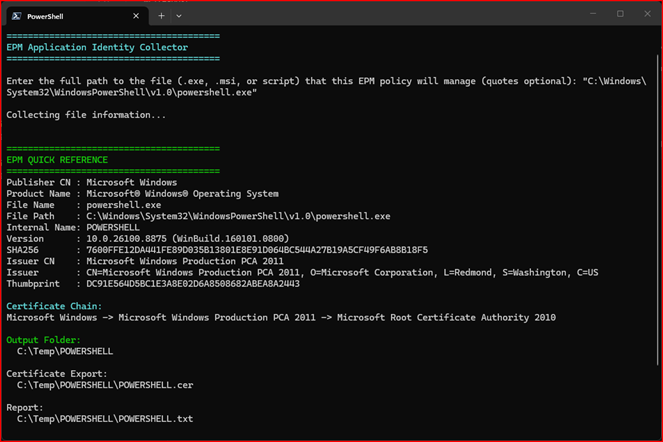
Script Outputs
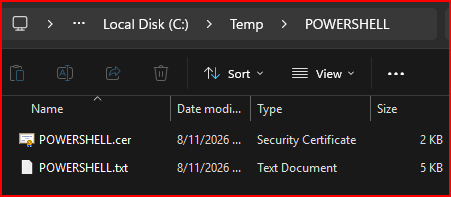
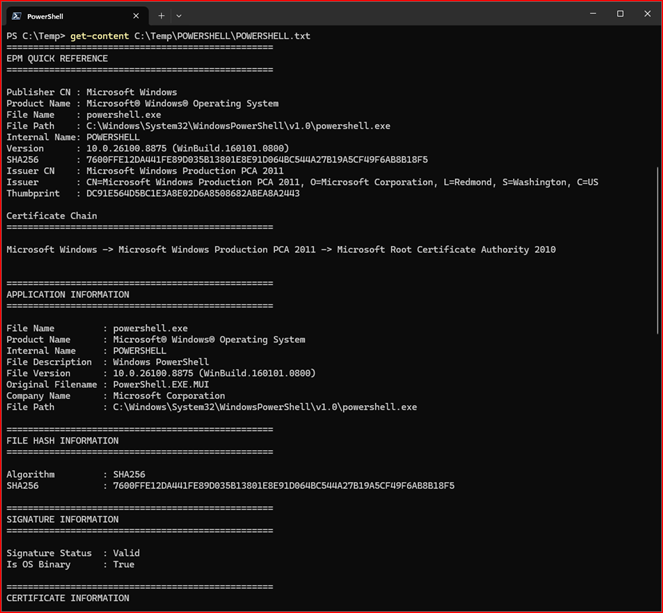
The script reads file information, calculates hashes, examines digital signatures, exports certificates, and generates a text-based report in a dedicated application folder created in the same directory from which the script was launched. It uses the application internal name when available, or the file name when internal name information is unavailable. You never know when you might need all this for security reviews, change management approvals, application onboarding, or audit documentation.
Example Output Structure
Final Thoughts
Creating reliable Endpoint Privilege Management policies starts with understanding an application’s identity. Get-EPMInfo.ps1 streamlines that discovery process by gathering hashes, signatures, certificates, metadata, and trust chain information into a single, easy-to-consume report.
For Intune and EPM administrators, the script serves as both a rule creation assistant and a documentation generator, reducing manual effort while improving consistency and accuracy.
I hope this helps.
You’ve seen my blog; want to follow me on socials? @JeffGilb Jeff Gilbert | LinkedIn
